eSIM QR Code iPhone for RSIM / SIMHUB
Description
eSIM QR Code - [ QPE Method ]
What is the QPE Unlock Solution?
The QPE Unlock Solution is based on the latest iPhone baseband loophole. The QPE unlock SIM is designed to remove SIM card restrictions on SIM-locked QPE iPhones (Qualcomm + Physical SIM + eSIM)
It works on iPhones with Qualcomm baseband and requires assistance with eSIM installation
This solution allows the iPhone to work with any carrier SIM. It provides a 100% stable signal and reliable data service, with no activation pop-up screens. There is no signal loss, no missed calls, and the experience is very close to using a factory-unlocked iPhone
How to order?
XXX Input the corresponding code based on your carrier
Place order via Carrier "Code"
| Carrier | Code |
| US AT&T | 101 |
| US T-Mobile | 102 |
| US Xfinity | 103 |
| US Spectrun | 104 |
| US Sprint | 105 |
| US Cricket | 106 |
| US MetoPCS | 107 |
| US TracFone | 108 |
| Australia Telstra | 109 |
| US Altice | 110 |
| Mexico Nextel | 111 |
| Philippines Smart | 112 |
| Canada Freedom | 113 |
| Austria Mobilkom | 114 |
| lreland Vodafone | 115 |
| Austria A1 Mobilkom | 116 |
| Hungary Vodafone | 117 |
| US Aragon | 118 |
| US Verizon | 119 |
| Ireland Hutchison/O2 | 120 |
| US GCI | 121 |
| US Cellular | 122 |
| Japan AU | 123 |
| Canada Bell | 124 |
| US Visible | 125 |
| Retail EasyPay | 126 |
| US Viaero | 127 |
| Hungary Telenor | 128 |
| EMEA Service | 129 |
| US Ultra Mobile | 130 |
| RedPocket | 131 |
| Japan UQ | 132 |
| US Dish Boost | 133 |
| Guatemala Tigo | 134 |
| US C Spire | 135 |
| Dominican Republic | 136 |
| US COX | 137 |
| US Reseller Flex | 138 |
| Japan Docomo | 139 |
| Puerto Rico Claro | 140 |
| Canada Rogers | 141 |
UK T-Mobile Orange | 142 |
eSIM Installation Tutorial
Step 1. Download the certificate
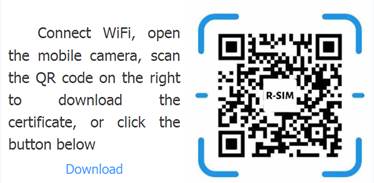
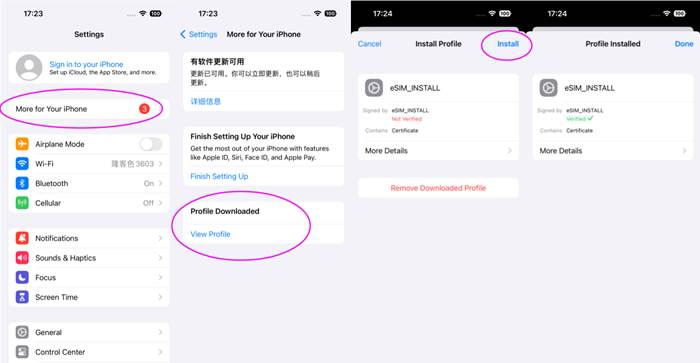
Step 2. Install the certificate
After downloaded the certificate, return to "Settings" and follow the picture bellow to install the certificate:
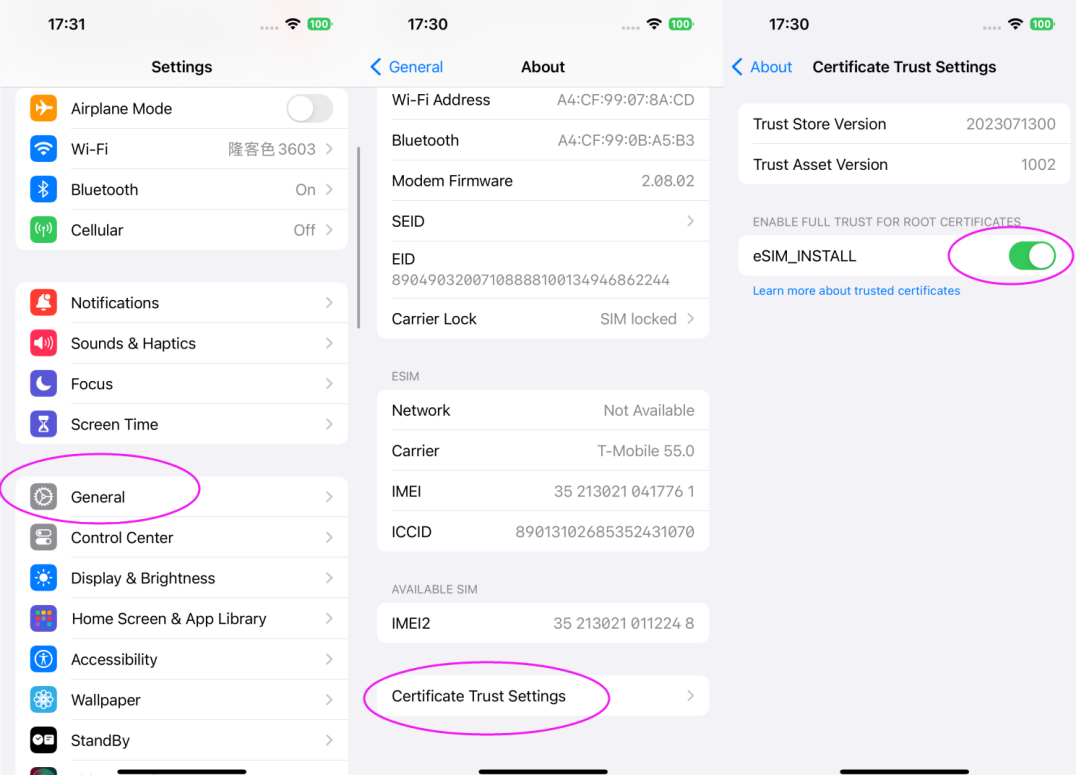
Step 3. Trust the certificate
Don't forget this step, otherwise you won't install successfully.
Enter Setting > General > About >Certificate Trust Settings
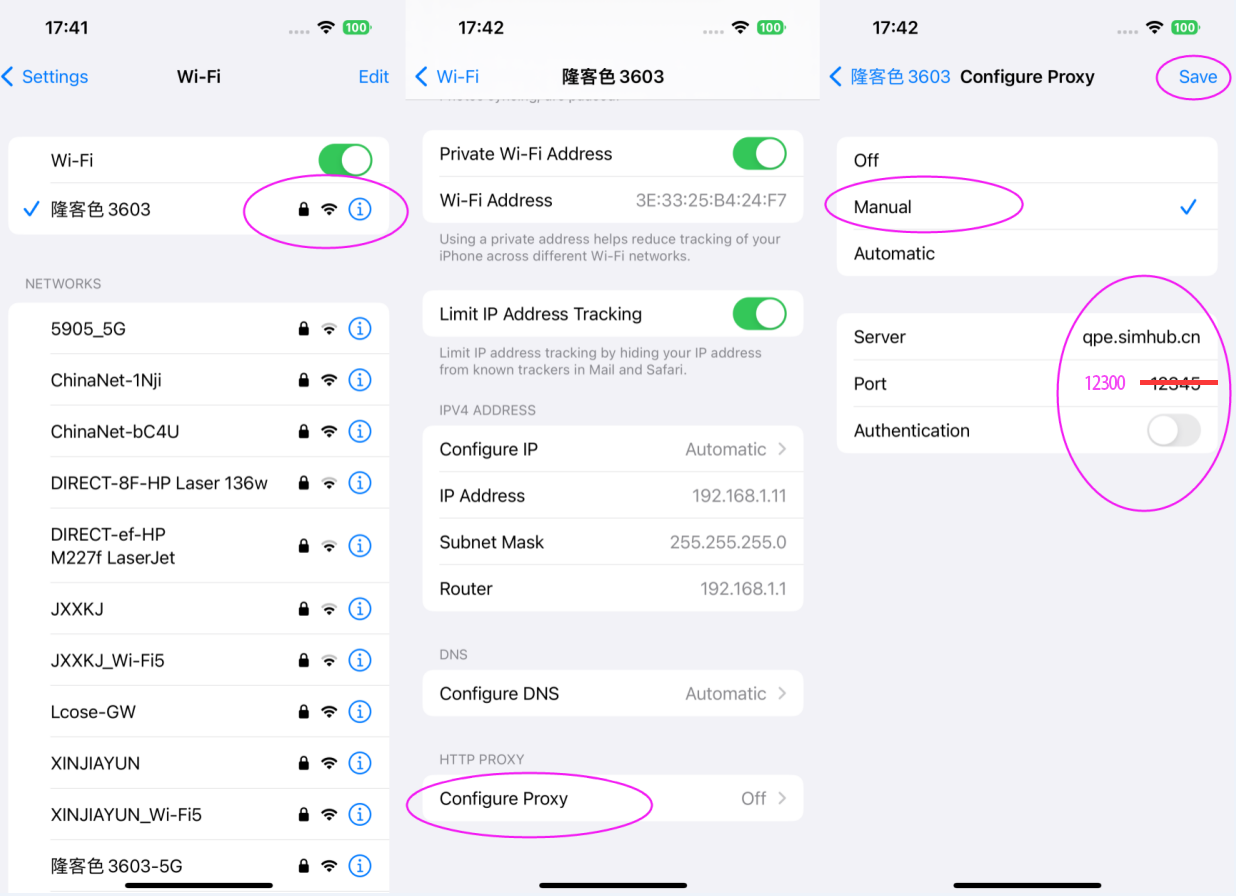
Step 4. Configure WiFi proxy
Enter Settings> > Wi-Fi> >Click your connected
WiFi> > Draw to the bottom> >Configure Proxy> > Choose Manual> > Enter Server and port> > Storage
(click to save to take effect)
server : qpe. simhub.cn
From 2026/01/21 new port : 12300
The eSIM port has been changed to 12300. Please delete the old certificate and download the new one.
After setting the previous steps, please open the Camera APP,scan the installation environment detection QR code below, check whether it is effective; .
If it shows Green color "The current environment can install eSIM(当前环境可扫码添加eSIM)", you can continue the 5th step;
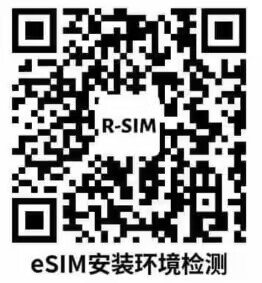

If it shows "non-private link",check Your certificate whether installed and trusted, follow 2th step and 3th step;
If it shows "eSIM cannot be installed in the current environment",
check your WIFI proxy whether is correct, follow 4th step;

Step 5. Add cellular plan
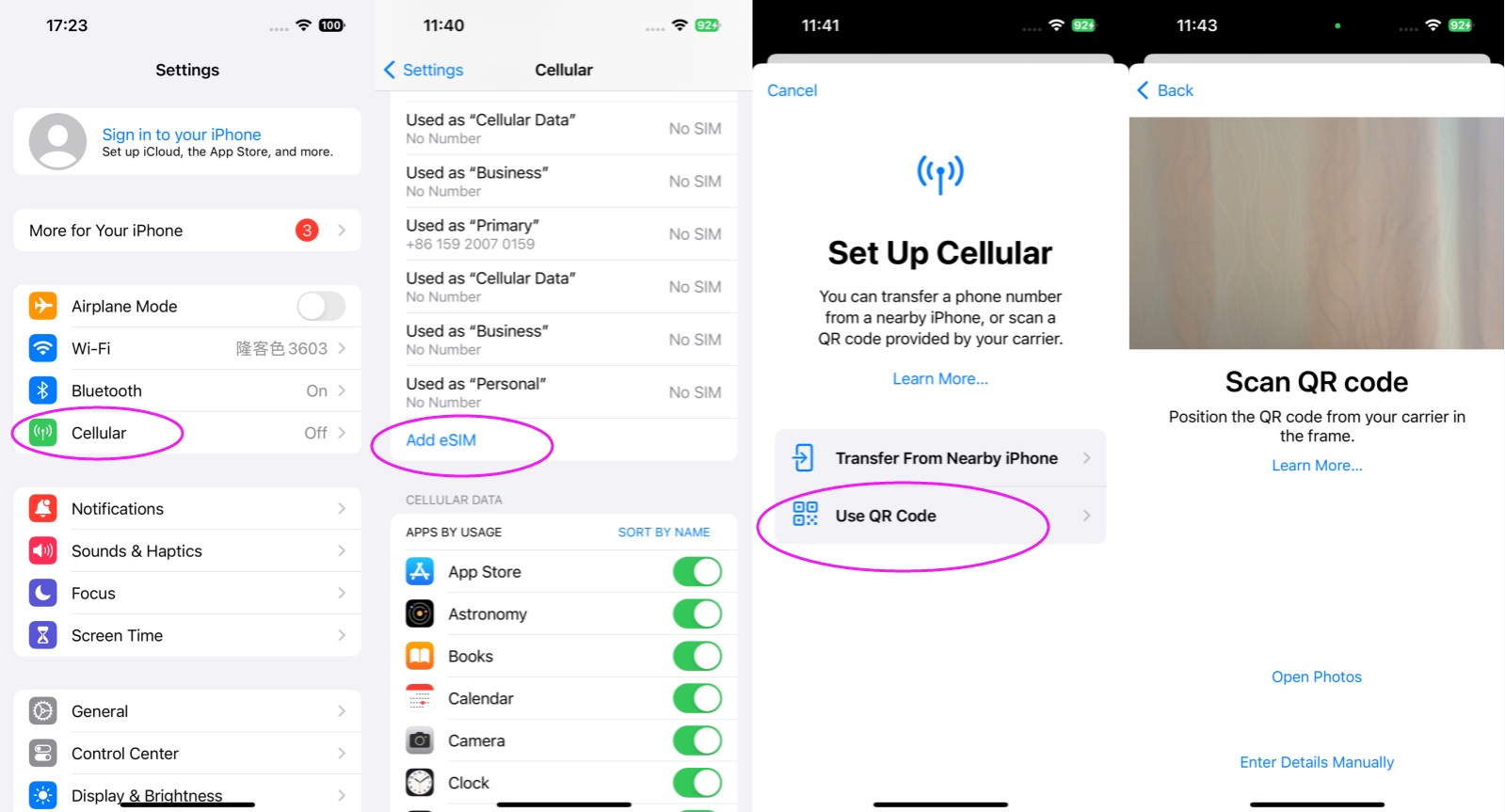
Enter Setting > Cellular > Add eSIM > Use QR Code
Step 6. Close the WiFi proxy and remove certificate
Turn off the WiFi proxy: Settings > Wi-Fi > Click connected WiFi >Configure Proxy > Off >Save
Remove certificate: Settings > General > VPN & Device Management>eSIM_ INSTALL > Remove Profiles
The WiFi will net probelm if certificate not removed
That's all, enjoy your unlocked trip!
Important Notice ( R-SIM ECode Solution for customize eSIM QR )
1. The eSIM for QPE eSIM unlock solution is only supported below devices:
a. iPhone 12+/13+/14+/15+/SE3 models(Qualcomm Baseband)
b. The device must have eSIM and physical sim slot
2. What is QPE eSIM used for?
but it can't make the device unlocked(No SIM Restriction)
One eSIM only be used in one device;
All the esim here is virtual, no signal, no net, need works together with rsim
Price
$3.00
Information
Delivery time: Instant
Bulk orders allowed: No
Order type: Custom
Service type: Server
Submit to verify allowed: No
Cancellation allowed: No
Order processing: API